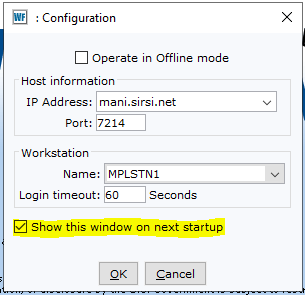
All desks should have this screen at all times when opening Workflows, the importance of leaving the checkbox marked “Show this window on next startup” (highlighted in yellow) is in the event the normal station account is locked out or if the library loses internet connectivity the option to still use ONLINE Workflows is available.
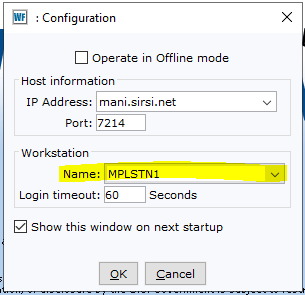
Once this window appears, the Workstation Name (highlighted below) should match the cash drawer number (if label is missing please reference the following below).
- MPLSTN1 - Main Desk East (facing security gates)
- MPLSTN2 - Main Desk West (facing main floor stairwell)
- MPLSTN3 - Youth Desk West (facing towards 8th street)
- MPLSTN4 - Youth Desk East (facing youth entrance)
- MPLSTN5 - Remote Desk (1st floor facing Ideabox)
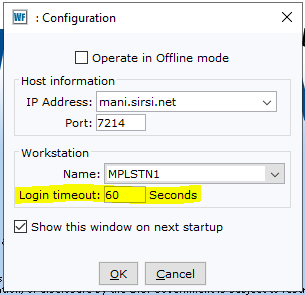
Please note to give the login timeout around 60 seconds, this should help with long account logouts and avoid waiting several hours until the account is unlocked.
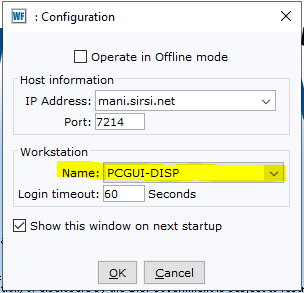
In the event the corresponding station account is locked out and does not allow access after 30 minutes, please utilize the Workstation name PCGUI-DISP (shown below), to regain access to Workflows. Multiple desks can use this same Workstation Name in the event a full Workstation Name account lockout happens and does have the cash management option to continue taking in funds. This is a temporary fix and should only be used for an entire shift, not continuous shifts or days.
THIS IMPACTS CASH DRAWERS, PLEASE CHECK DAILY THAT THE CASH DRAWER CORROSPONDS WITH THE STATION LOGIN